
The recycled glasses we receive need to be cleaned and processed so that they can be added to our global online catalog. This can be done at home, as an independent organization, or at one of our sorting events.

Events
View upcoming donation drives and processing events.

Request glasses
Request glasses to process yourself or as an organization.
Step 2. Login to your ReSpectacle volunteer account
Create an account on the ReSpectacle website to start cataloguing glasses.
- Navigate to the ReSpectacle main site and click Login at the top right.
- Create or login to your ReSpectacle account.
- Visit our volunteer instructions page for detailed instructions.

Step 3. Prep the glasses
Ensure that the glasses pass our quality checks.
- Inspect the glasses. Per ReSpectacle guidelines, the following issues immediately disqualify glasses from the catalog:
- Missing one or both temples (sometimes called "arms")
- Missing one or both nose pads
- Missing one or both lenses
- Lenses that are loose or readily fall out
- Lenses with major cracks (more than 1/4" or 1/2 cm)
- Lenses difficult to see through due to scratches or peeling coatings
- Hinges that are non-functioning or missing hardware
- Any sharp points
- Deformation beyond simple repair
- Clean off the glasses using a rag and cleaning solution.
Step 4. Catalog the glasses onto the ReSpectacle site
Gather a pair of glasses, a printed QR code, and a plastic bag.
- On the mobile device of your choosing, navigate to the volunteer page.
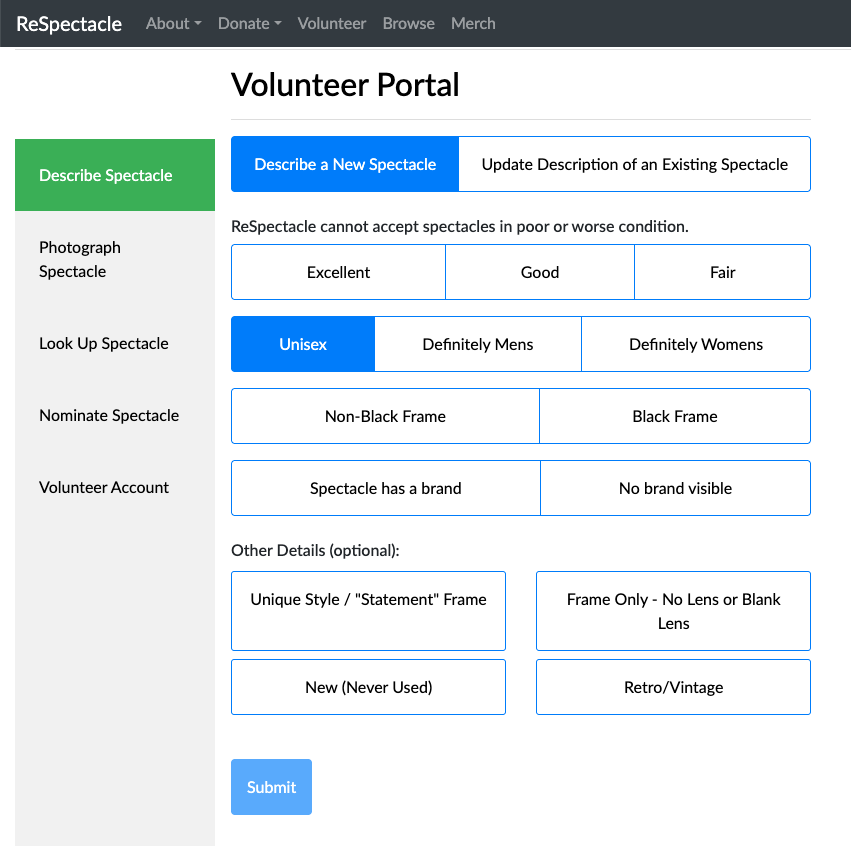
- Fill out all of the items under the describe spectacle tab based on your pair of glasses.
- Click on photograph spectacle and use your device to take a picture of your glasses against a plain background or white trifold backdrop.
- Click on look up spectacle and scan the printed QR code using your device's camera.
- The page will automatically reload and submit all the information for that pair of glasses.
Step 5. Package glasses for drop-off
- Pack the glasses and the corresponding printed QR code into a plastic bag.
- Repeat with each pair of glasses and a corresponding QR code until all glasses are catalogued and packed into plastic bags.
- The glasses are now cataloged and ready to be dropped off.